Turn business knowledge into a deployed voice agent.
Import your website, pricing, hours, and FAQs. Review what the agent knows, prove the conversation in the browser, then assign an inbound number—all from one operating surface.
The same browser-to-Worker voice path customers use to test an agent. No account or phone number required.
Microphone off90 sec cap
Try asking
Your conversation appears here. Try: “How would you handle calls for an HVAC company?”
Public demo controls
One-time connection ticket
Hard stop after 90 seconds
Gemini Native Audio
Do not share sensitive information
Inbound deployment pathtenant-scoped by design
01
Business BrainWebsite, pricing, hours, FAQs, approved files
Ground
02
Voice agentPrompt, tools, safeguards, engine, and fallback
Test
03
Inbound numberAssigned route with an explicit engine selection
Deploy
04
Call operationsTranscript, recording, lead, cost, and audit history
Operate
UIRESTMCP
One resource model across every build surface.
Deployment workflowOne source of truth
01
GroundImport and approve business facts
02
ProveTest voice, tools, and fallbacks
03
RouteAssign an agent and engine to a number
04
OperateInspect calls, costs, leads, and versions
UIRESTMCP
Same tenant-scoped resources.
Product architecture preview · voice performance depends on engine, carrier path, region, and network
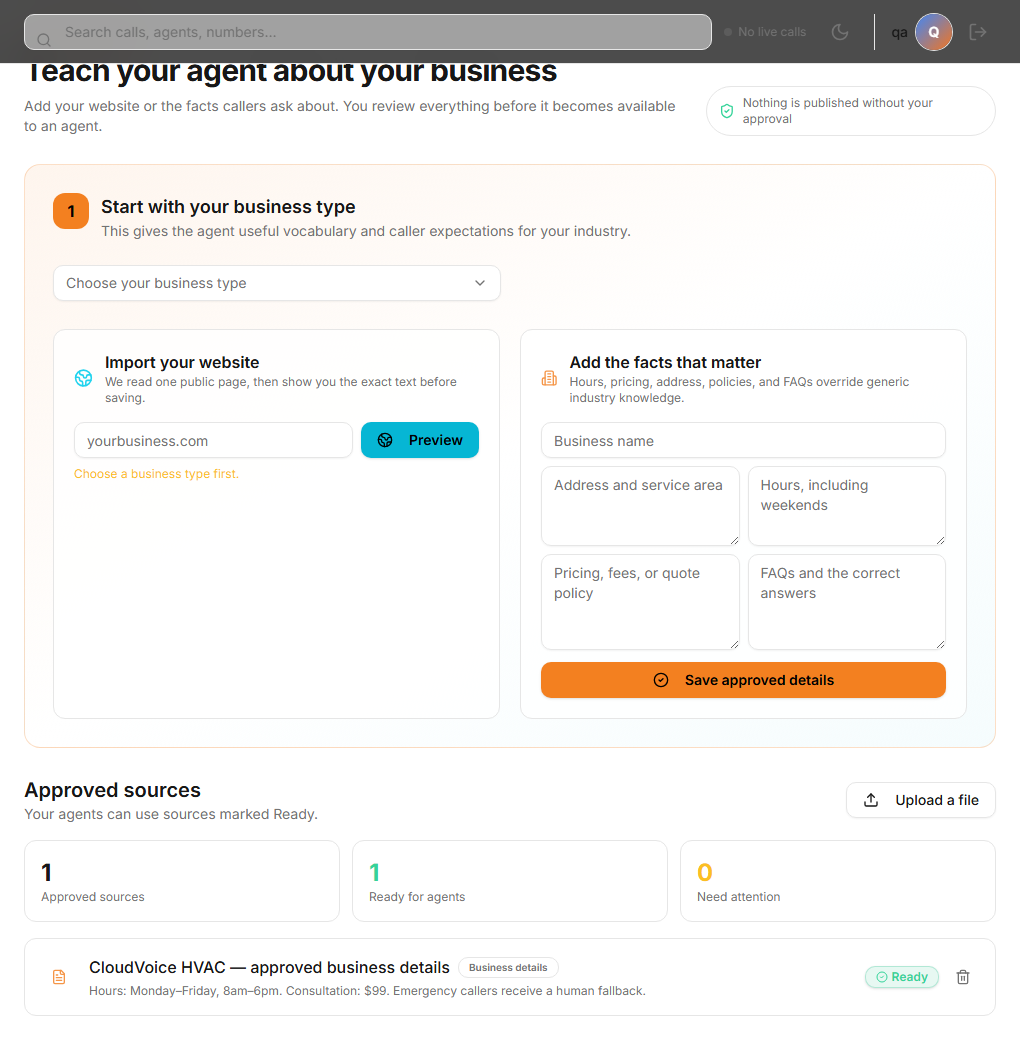
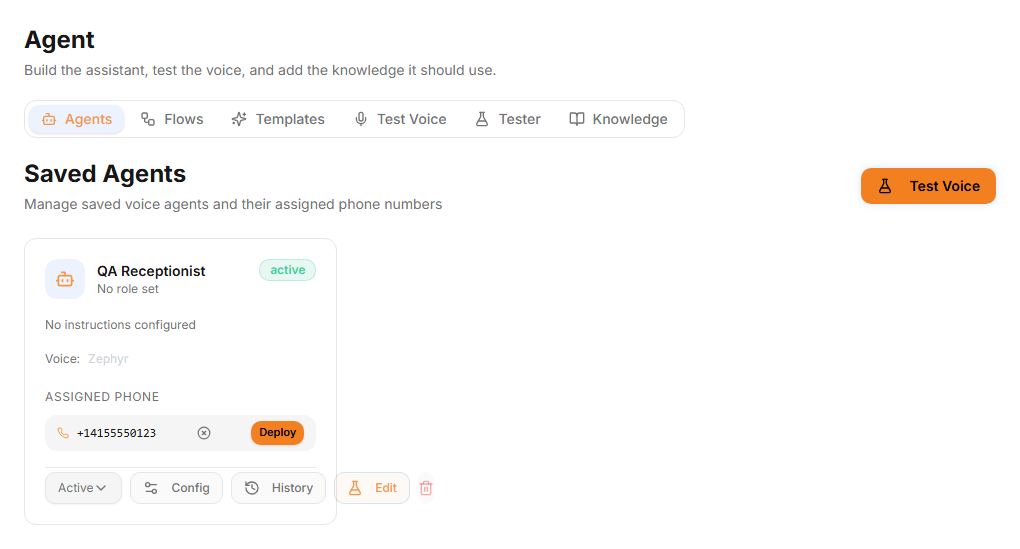
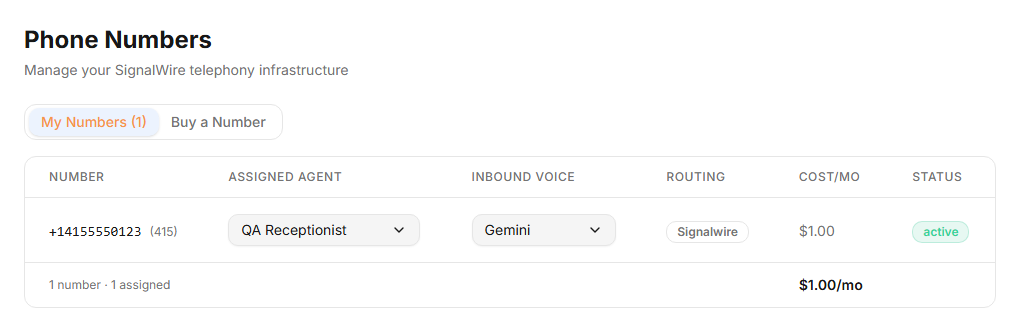
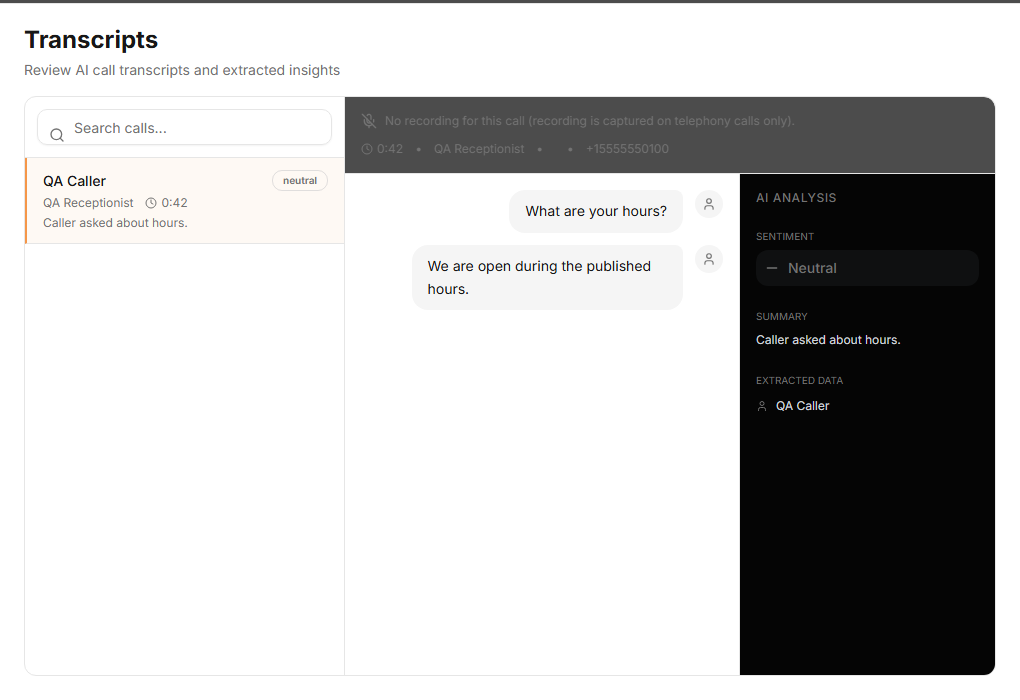
Workspace proof
From approved facts to an operating call.
The build surface is visible end to end: ground the agent, test the conversation, route a number, inspect the call, and watch usage.
01 · GroundApprove business factsWebsite, pricing, hours, and FAQs stay reviewable before indexing.
02 · ProveTest the agentKeep the prompt, voice, tools, and deployment history in one workspace.
03 · RouteAssign inbound routingChoose the number, engine, and agent explicitly before calls arrive.
04 · OperateInspect the callReview the transcript, summary, sentiment, and extracted caller details.
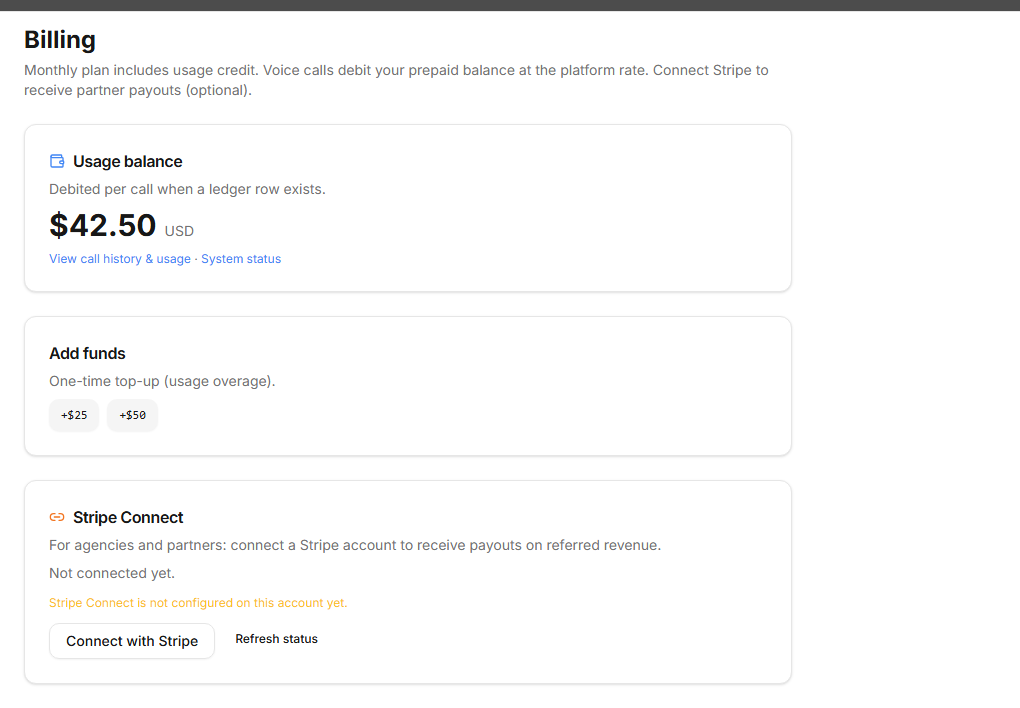
05 · GovernWatch the ledgerUsage is visible and prepaid balance is kept separate from call configuration.
Release-test capture: these are screenshots of the deployed CloudVoice workspace UI rendered with synthetic QA data. No customer data, payment, number purchase, or production write is represented.
3
Inbound voice engines
Edge · Gemini · CloudVoice
UI + API
Two ways to build
same tenant-scoped resources
MCP
AI-native operations
tools + resources
24/7
Inbound availability
subject to provider health and balance
Browser release checksLanding, responsive, keyboard, Axe, and Worker health.
The current production Chromium suite exercises the public control surface and records its assumptions.
Voice path evidenceEdge, Gemini, and CloudVoice browser-wire paths.
Automated media checks reach greeting, caller transcription, and spoken reply. Human listening and PSTN remain separate acceptance gates.
Tenant controlsOne resource model across UI, REST, and MCP.
Tenant isolation, explicit live-route confirmation, and durable deployment history keep changes reviewable.
Qualified performanceMeasured in a controlled lab, without an invented SLA.
Current evidence is published with its limits; field p75 and production guarantees require a real-user dataset.
An inbound agent can answer common questions, capture leads, call approved tools, book supported calendar events, and transfer when a human should take over. You control the knowledge, behavior, and route.
24/7 Coverage
Cover the calls your team cannot.
Route inbound calls to an agent outside office hours or while your team is busy, subject to provider health, account balance, and your configured fallback.
What you getA consistent first response with visible routing, call records, and an explicit human fallback.
Books Appointments
Uses the scheduling actions you approve.
Connect a supported scheduling tool, test its availability and booking actions, and let the agent use only the operations you approve.
What you getSupported calendar availability and booking actions inside the conversation, with the final result visible to your team.
Tier 1 Complaints
Handles the calls that would have hit a queue.
Answers approved FAQs and can call configured tools for tasks such as order status or lead capture. Unknown or sensitive cases follow your fallback policy.
What you getA repeatable front line for common requests, with escalation paths for everything else.
CRM-Aware Conversations
Knows your inventory. Knows your team.
Connect your systems through signed tools, webhooks, REST, or MCP. Test tool behavior before a live call and keep credentials in the encrypted vault.
What you getA practical integration layer for the systems you approve, with visible configuration and test results.
Controlled Transfer
Hands off when a human should take over.
Configure an approved transfer destination and the conditions that should end the automated conversation. The resulting call record preserves the operational context.
What you getA deliberate escape hatch instead of an agent that improvises beyond its scope.
Vectorized Knowledge
Ground the agent in approved sources.
Import a public website, paste approved facts, or upload business documents. Review the extracted text before indexing and keep each source visible in the Business Brain.
What you getGrounded answers from approved sources, plus a clear place to correct missing or outdated information.
Call Intelligence
Keeps the operational record.
Store call records, transcripts, summaries, dispositions, extracted fields, costs, and recordings according to your configured retention policy.
What you getA searchable history your team can review, export, and use to improve the agent deliberately.
Versioned Improvement
Change it without losing the last good version.
Agent updates create version history, publish checks surface missing essentials, and test scenarios help you inspect behavior before deployment.
What you getControlled improvement with diffs and rollback instead of an opaque agent that silently changes itself.
Choose the right voice path
Three inbound engines. One operating model.
Pick the engine that fits the conversation, margin, and provider requirements. CloudVoice keeps the agent, number routing, business knowledge, call records, and billing model in one workspace.
Edge
Composable pipeline
STTDeepgram
LLMGroq-hosted models
TTSCartesia
Gemini Live
Native live audio
AudioBidirectional live session
VoiceGemini voice selection
RouteDefault inbound option
CloudVoice
Cloudflare-native
AIWorkers AI models
RouteAI Gateway
DemoLive above
cloudflare workers · health-aware engine selection at connection time · shared tenant-scoped business knowledge
Built on the Edge
Built around Cloudflare’s developer platform.
Workers route requests and WebSockets; Durable Objects hold live call state; D1 stores tenant records and billing; Vectorize supports knowledge retrieval; R2 stores configured audio artifacts.
Knowledge you can inspect and correct.
CloudVoice separates approved business knowledge from agent instructions. Website text and documents are reviewed before indexing, and each source remains visible in the Business Brain.
During a call, retrieval supplies relevant context to the selected engine. Call records and configured caller summaries help your team understand what happened without pretending that vector search is perfect memory.
Vector retrieval
Approved sources are chunked and indexed so the agent can retrieve relevant business facts during a turn.
Caller context
Configured summaries and call records can provide continuity within your retention and privacy policy.
Stateful edge sessions
Durable Objects hold call-scoped state close to the Worker path while each provider completes its part of the conversation.
Scoped credential vault
Provider and tool credentials are encrypted and tenant-scoped. Regulated deployments still require the right agreements and configuration.
Inbound-first telephony
Assign a number. Control the route.
Provision or connect a number, assign an agent and inbound engine, then inspect each completed call. Outbound dialing remains disabled until the account and compliance controls are ready.
Managed number routing
// number → agent → engine
Choose the assigned agent and inbound engine per number. The media WebSocket connects to a call-scoped Durable Object and records the resulting operational trace.
BYOC and human transfer
// controlled integration points
Use platform telephony or configured carrier credentials, then route qualifying inbound calls to a human fallback when the agent should not continue.
Operating principle
Speed comes from removing setup work.
The product promise
CloudVoice is designed to shorten the path between “here is how my business works” and a testable inbound voice agent. Website import, visible business facts, agent settings, browser testing, number routing, and call records live in one operating surface.
The same tenant-scoped resources are exposed through the workspace, REST API, and MCP. That means a human can configure the agent visually while an automation manages repeatable operations without creating a second source of truth.
We earn the right to call it fast through observable setup steps and successful tests — not an unsupported latency promise.
CloudVoice AI · Inbound first, observable by design
Pricing
Metered usage. Visible before you deploy.
Build and test the configuration in the workspace, then fund the prepaid ledger when you are ready for metered voice usage. The dashboard shows balance and call costs.
Workspace
Self-servebuild and test
Create agents, add approved business knowledge, run browser tests, configure tools, and inspect your deployment path in one interface.
Website and document knowledge import
Agent configuration and versions
Browser voice sandbox
REST API and MCP access
Per-Minute Usage
$0.20/ billed minute
Metered voice usage is debited from the prepaid ledger. The bundled rate covers the CloudVoice platform path; configured carrier or bring-your-own-provider arrangements may have separate terms.
Edge, Gemini, and CloudVoice engine options
Inbound number routing
Business Brain retrieval
Call record and cost visibility
Clear release boundary: inbound is the product focus. Outbound dialing is disabled until account, carrier-registration, consent, and compliance controls are complete.
Cost Calculator
What's it worth to your business?
Move the sliders to match your operation. The math updates live, using your numbers — not ours.
Monthly revenue lost to missed calls during open hours
$0
Monthly revenue from 24/7 coverage after-hours capture
$0
CloudVoice AI estimated monthly cost $0.20/min × estimated minutes
$0
Net monthly upside
$0
Illustrative model only. All values come from your sliders; this is not a promise of recovered revenue, conversion, availability, or savings.
Built for inspectability.Versioned agent settings, approved knowledge sources, tenant-scoped API keys, explicit engine selection, call records, and a prepaid ledger make the operating state visible.
Frequently Asked
Questions we hear most.
Pricing, security, integrations, and what happens when the AI hits its limits. If your question is not here, use the support assistant or contact the team.
How is CloudVoice AI priced?
Metered voice usage is $0.20 per billed minute on the bundled CloudVoice platform path and is debited from a prepaid ledger. Bring-your-own-provider or carrier arrangements may have their own costs. Review the current dashboard billing terms before production use.
Is it HIPAA compliant?
CloudVoice does not make a HIPAA-compliance claim. Healthcare deployments require counsel, appropriate access and retention controls, and an executed BAA with every in-scope provider that creates, receives, maintains, or transmits PHI. Cloudflare states that its BAAs are available to Enterprise customers and that HIPAA is not a certification. Do not place PHI in CloudVoice until those requirements have been confirmed for your specific deployment—see our Privacy Policy.
Can it integrate with my CRM?
CloudVoice exposes signed tools, webhooks, REST endpoints, and MCP operations. Whether a specific CRM workflow is ready depends on the API and credentials you configure; test each action in the workspace before allowing it on live calls.
How do we run a security or procurement review?
Start with the technical docs, privacy policy, and public status. For an enterprise evaluation, contact the CloudVoice team with your required data, access, retention, telephony, and provider-review questions. Do not treat a website statement as a completed security assessment.
What happens if the AI cannot answer?
Configure a factual fallback, capture a message, or transfer an inbound call to an approved number. For high-stakes topics, instruct the agent not to improvise and include those cases in the test suite.
Should callers be told they are speaking with AI?
Use a clear disclosure whenever your policy, industry, or jurisdiction requires one. Recording and AI disclosure obligations vary; CloudVoice configuration is not a substitute for legal review.
How long does setup take?
A simple browser agent can be drafted quickly from approved business facts. Production timing depends on knowledge review, tools, phone provisioning, billing, compliance, and successful live voice testing.
What about call recording, transcripts, and compliance?
The product supports call records, transcripts, recordings, redaction, retention settings, and exports. You are responsible for configuring disclosures, consent, access, retention, and deletion for your use case and jurisdictions.
What languages does it support?
Language and voice support depends on the selected engine and model. Validate the exact language, accent, tool behavior, and phone path you plan to deploy.
Can I bring my own providers?
The Edge pipeline supports configured provider choices and the credential vault includes bring-your-own-key options. Availability varies by provider; the CloudVoice engine uses platform Cloudflare credentials.
Built for operators
Build the agent. Prove it before the first call.
Everything, self-serve
Start with approved business facts, choose an engine, test the conversation and tools, then attach telephony only after the agent passes your release checklist.
Website-to-Business-Brain import with explicit review
Agent configuration and version history in one workspace
Signed tools, REST API, webhooks, and MCP operations
Prepaid metering with visible balance and call costs
Inbound routing with an explicit human fallback
For enterprise evaluation, security review, data-boundary questions, or a guided deployment plan, contact the team before routing production calls.
We ship on Cloudflare (Workers, Durable Objects, D1, Vectorize). Latency depends on your PSTN carrier, codec path, and region — our stack is built for low tail latency, not a universal SLA. Healthcare: CloudVoice makes no HIPAA-compliance claim; your deployment requires counsel, appropriate controls, and every in-scope provider agreement before PHI is used—see Privacy. Memory combines configured RAG/vector retrieval with approved business sources; it is not perfect recall. Integrations (CRM, calendars) are scoped per deployment; confirm the actions and credentials you plan to allow on live calls.
Try the public demo, then create a workspace to build from your own approved business facts. Connect a real number only after the browser agent, tools, and fallback behavior pass your tests.